 TIMEBUCKS
Low minimum
payout of just
$3 — start
earning today!
If you want to know how to deposit money on Deriv using M-Pesa, you’ve come to the right place.
It’s one of the fastest and most convenient ways to fund a Deriv trading account in Kenya — and it can be done in under two minutes directly from your Safaricom line.

Whether this is your first deposit or you’ve been trying to figure out why a previous attempt failed, this guide walks you through the entire process step by step, including how to withdraw your profits back to M-Pesa when you’re ready.
How to Deposit on Deriv via M-Pesa
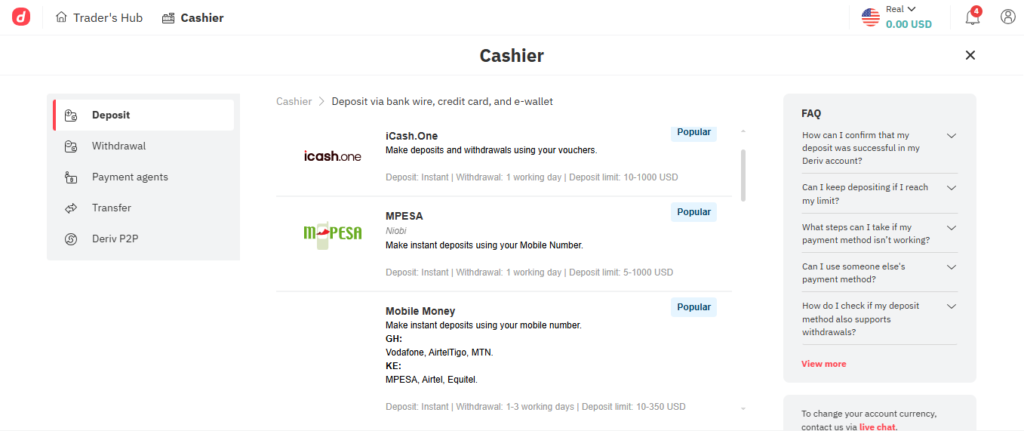
To deposit on Deriv using M-Pesa: log into your Deriv account → go to Cashier → select Deposit → choose M-Pesa (Fast Pesa) → enter your Safaricom number and amount → confirm the STK push on your phone with your M-Pesa PIN. Funds are credited to your Deriv account within minutes. Minimum deposit is $10 (approx. Ksh 1,300).
What Is Deriv Fast Pesa?
Deriv has a localised M-Pesa payment method specifically designed for Kenyan traders called Fast Pesa (also referred to as Instant Pesa in some versions of the platform). It is a direct integration between Deriv and M-Pesa that allows you to:
- Deposit in Kenyan Shillings (KES) — no need to first convert to USD manually
- Receive an STK push directly on your Safaricom phone to confirm payment
- Get funds credited to your Deriv account instantly to within minutes
- Withdraw profits directly back to your M-Pesa wallet
This is not a third-party workaround. Fast Pesa is an official Deriv payment method, fully integrated within the platform’s Cashier section. It is purpose-built for Kenyan traders and has made Deriv one of the most accessible international brokers in East Africa.

Before You Deposit: What You Need Ready
Before making your first M-Pesa deposit on Deriv, make sure you have these in place:
1. A verified Deriv account You must complete identity verification (KYC) before you can deposit and withdraw on Deriv. This means uploading:
- A clear front and back photo of your Kenya National ID
- A proof of address — a bank statement with your physical address works best (P.O. boxes are not accepted)
Important: Complete your KYC verification before you start trading — not after. Many Kenyan traders skip this step and then face withdrawal delays when they want to cash out. Verify early and avoid the frustration.
2. An active Safaricom M-Pesa line Your M-Pesa number must be registered in your name — the same name on your Deriv account. Using someone else’s number causes compliance issues and can lead to withdrawal complications later.
3. Sufficient M-Pesa balance The minimum M-Pesa deposit on Deriv is $10 (approximately Ksh 1,300). Make sure your M-Pesa wallet has at least this amount plus any applicable M-Pesa transaction fees before you begin.
4. A Deriv account in USD When setting up your Deriv account, select USD as your account currency. When you deposit via M-Pesa, the platform automatically converts your Kenyan Shillings to USD using the current exchange rate. You do not need to convert the money yourself.
Step-by-Step: How to Deposit on Deriv Using M-Pesa
Follow these steps carefully to make a successful M-Pesa deposit on Deriv:
Step 1: Log Into Your Deriv Account
Go to deriv.com and sign in with your email and password.
TIMEBUCKS
Low minimum
payout of just
$3 — start
earning today!
Step 2: Go to the Cashier
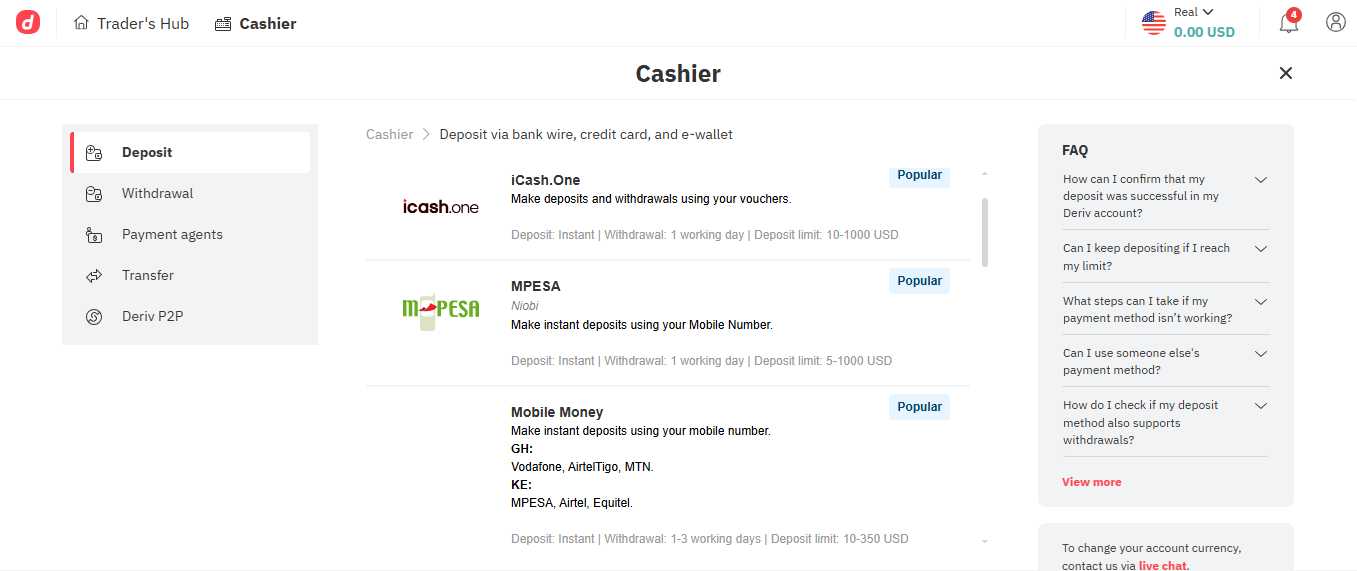
Once logged in, click on your account balance shown at the top of the page, then click on “Cashier”. Alternatively, look for the Cashier option in the main navigation menu.

Step 3: Select “Deposit”
Inside the Cashier section, you’ll see two options — Deposit and Withdrawal. Click “Deposit”.
Step 4: Choose M-Pesa / Fast Pesa
A list of available payment methods will appear. Look for M-Pesa or Fast Pesa and click on it. If you’re on the Kenyan version of the platform, this should appear prominently near the top of the list.
Step 5: Enter Your M-Pesa Phone Number
Type in your Safaricom phone number — the one registered to your M-Pesa account. Make sure it matches the name on your Deriv account.
TIMEBUCKS
Low minimum
payout of just
$3 — start
earning today!
Step 6: Enter the Deposit Amount
Type in the amount you want to deposit. You can enter this in KES or USD depending on how the platform displays it. Remember:
- Minimum: $10 (approx. Ksh 1,300)
- Maximum: $1,000 per transaction (approx. Ksh 130,000)
Step 7: Confirm on Your Phone (STK Push)
After submitting your deposit request, an STK push notification will appear on your Safaricom phone. This is an automatic prompt asking you to confirm the payment.
- Enter your M-Pesa PIN when prompted
- Tap “OK” or “Confirm” to approve the transaction
Step 8: Wait for Confirmation
Once you approve the payment on your phone, you’ll receive:
- An M-Pesa confirmation SMS from Safaricom showing the amount deducted
- A Deriv notification confirming the deposit was received
Your account balance on Deriv should update within a few minutes to a maximum of 1 working day. In most cases, it’s nearly instant.
Deriv M-Pesa Deposit: Key Details at a Glance
| Detail | Information |
|---|---|
| Minimum deposit | $10 (approx. Ksh 1,300) |
| Maximum deposit | $1,000 per transaction (approx. Ksh 130,000) |
| Processing time | Instant to 1 working day |
| Deriv deposit fee | None — Deriv charges no deposit fees |
| M-Pesa transaction fee | Standard Safaricom Paybill charges apply |
| Currency | Deposit in KES, auto-converted to USD |
| Available days | Monday – Sunday (including weekends) |
| Account requirement | Verified Deriv account (KYC completed) |
Other Mobile Money Options for Kenyan Traders
M-Pesa is the most popular method, but Deriv also supports other mobile money providers in Kenya:
Airtel Money
- Works the same way as M-Pesa via the Cashier section
- Minimum: $10
- Processing: 1 working day
- Best for traders on the Airtel Kenya network
Equitel
- Equity Bank’s mobile money service
- Minimum: $10
- Processing: 1 working day
- Best for traders who bank with Equity Bank
All three mobile money options use the same Cashier → Deposit flow within Deriv. Simply select your preferred provider instead of M-Pesa when prompted.
How to Withdraw Money from Deriv to M-Pesa
Getting your profits back to your M-Pesa wallet is just as straightforward as depositing. Here’s the process:
Step 1: Log in and go to Cashier
Click your account balance → Cashier.
Step 2: Click “Withdrawal”
Select the Withdrawal tab from inside the Cashier section.
Step 3: Select M-Pesa / Fast Pesa
Choose M-Pesa as your withdrawal method. Enter your Safaricom number — it must match the one linked to your Deriv account.
Step 4: Enter the amount
Type in how much you want to withdraw. There is no stated minimum withdrawal amount via M-Pesa, but make sure your account has sufficient balance after any trading requirements are met.
Step 5: Confirm and wait
Submit the withdrawal request. Deriv will process it and send the money to your M-Pesa account. Processing typically takes 1–3 business days, though many traders report receiving funds within the same day or within a few hours.
You’ll receive an M-Pesa SMS from Safaricom once the money arrives in your wallet.
Pro Tip: Withdraw your profits regularly. Do not let a large balance accumulate in your Deriv account indefinitely. Getting money into your M-Pesa wallet is how you actually benefit from your trading — and regular withdrawals also reduce risk in case of any account issues.
Fees: What Does M-Pesa Deposit on Deriv Actually Cost?
Here’s a clear breakdown of what you pay:
Deriv’s side: Zero. Deriv does not charge any deposit or withdrawal fees for M-Pesa transactions.
Safaricom’s side: Standard M-Pesa Paybill/transaction fees apply on the Safaricom end. These are small, tiered fees based on the amount you’re sending. For context:
- Paybill transactions of Ksh 1 – Ksh 100: No charge
- Larger amounts attract small tiered fees (typically Ksh 5 – Ksh 100 depending on amount)
- All M-Pesa transaction fees include a 20% excise duty levied by the Kenya Revenue Authority (KRA)
In practice, the total fee you pay Safaricom to send Ksh 1,300 (the minimum deposit) is very small — usually under Ksh 15. Always check the Safaricom fee schedule before sending, as charges are reviewed periodically.
Third-party agents: Some traders use P2P (peer-to-peer) agents or unofficial services to deposit. These agents may charge a markup of 1–2% above the standard rate. Where possible, use the direct Fast Pesa method within Deriv’s Cashier section to avoid these extra costs.
Common Problems and How to Fix Them
“I didn’t receive the STK push on my phone”
- Make sure you entered the correct Safaricom number
- Check that your phone has network coverage and is not in airplane mode
- Wait 2–3 minutes then try again — STK pushes can sometimes be delayed
- If the problem persists, contact Deriv live chat support
“The deposit went through on M-Pesa but my Deriv account wasn’t credited”
- First wait up to 1 working day — processing can take time
- Take a screenshot of your M-Pesa confirmation SMS
- Go to Cashier → Payment Agent or check your Deriv transaction history to see the deposit status
- Contact Deriv customer support via live chat with your M-Pesa transaction ID (the MPESA code in your SMS)
“My withdrawal to M-Pesa was rejected or delayed”
The most common reason for withdrawal issues is incomplete KYC verification. If you haven’t uploaded your National ID and proof of address, Deriv cannot process withdrawals. Complete verification first.
Other causes include:
- The M-Pesa number on your Deriv account doesn’t match your registered Safaricom name
- Your account has pending verification documents
- There is a minimum balance or margin requirement preventing withdrawal
“I used someone else’s M-Pesa number to deposit”
This can cause serious issues. Deriv requires that the payment method matches the account holder’s name for compliance reasons. If you deposited from a different number, contact Deriv support immediately to explain the situation before attempting to withdraw.
Deriv Deposit via M-Pesa vs Other Methods
| Method | Min. Deposit | Processing | Fees | Best For |
|---|---|---|---|---|
| M-Pesa (Fast Pesa) | $10 | Instant – 1 day | Low Safaricom fee | Most Kenyan traders |
| Airtel Money | $10 | 1 working day | Low Airtel fee | Airtel users |
| Equitel | $10 | 1 working day | Low Equity fee | Equity Bank clients |
| Cryptocurrency | $5 | 30–60 min | Network gas fees | Tech-savvy traders |
| E-wallet (Skrill/Neteller) | $10 | Instant | Wallet provider fees | Traders with e-wallets |
| Bank Transfer | $50 | 1–3 business days | Bank charges | Large deposits |
For the vast majority of Kenyan traders, M-Pesa is the fastest, cheapest, and most convenient option.
Tips for Safe and Smooth M-Pesa Deposits on Deriv
Always use your own registered M-Pesa line. Never use a family member’s or friend’s number — even with their permission. It creates a name mismatch that can block your withdrawals.
Complete KYC before your first deposit. Get your National ID and proof of address uploaded and approved before you deposit any money. This saves enormous frustration later.
Keep your M-Pesa confirmation SMS. The MPESA transaction code (e.g., “QKJ1A2B3C4”) is your proof of payment. Screenshot it or write it down in case you need to contact support about a delayed deposit.
Deposit amounts that match your trading plan. Don’t deposit more than you can afford to lose. The M-Pesa minimum of $10 is a good starting point for beginners.
Withdraw profits frequently. Don’t leave large profits sitting in your Deriv account. Move winnings to your M-Pesa wallet regularly and treat your Deriv account as a working capital account, not a savings account.
Start with a demo account first. If you haven’t traded before, open a free Deriv demo account here — no deposit required. Practice with $10,000 in virtual funds before committing real M-Pesa money.
Frequently Asked Questions (FAQs)
How do I deposit money on Deriv using M-Pesa?
Log into your Deriv account → go to Cashier → click Deposit → select M-Pesa or Fast Pesa → enter your Safaricom number and deposit amount → confirm the STK push that appears on your phone by entering your M-Pesa PIN. Funds are credited within minutes to 1 working day. Minimum is $10 (approx. Ksh 1,300).
What is the minimum M-Pesa deposit on Deriv?
The minimum deposit via M-Pesa on Deriv is $10, which is approximately Ksh 1,300 at current exchange rates. The maximum per transaction is $1,000 (approx. Ksh 130,000).
Does Deriv charge fees for M-Pesa deposits?
No. Deriv does not charge any deposit fees for M-Pesa transactions. However, standard Safaricom Paybill transaction fees apply on the M-Pesa side — these are small, tiered charges based on the amount sent, plus a 20% government excise duty on top.
How long does a Deriv M-Pesa deposit take?
Most M-Pesa deposits on Deriv are processed instantly or within a few minutes. In some cases it can take up to 1 working day. If your deposit hasn’t reflected after 24 hours, contact Deriv support with your M-Pesa transaction code.
Can I deposit on Deriv using someone else’s M-Pesa?
This is strongly discouraged. Deriv’s compliance rules require that the payment method matches the account holder’s name. Depositing from another person’s M-Pesa number can block your withdrawals and cause account verification problems.
How do I withdraw money from Deriv to M-Pesa?
Go to Cashier → Withdrawal → select M-Pesa → enter your Safaricom number and the amount → submit. Withdrawals typically process within 1–3 business days, though many are faster. You must have completed KYC verification before you can withdraw.
Why is my Deriv M-Pesa withdrawal delayed?
The most common reason is incomplete KYC verification — make sure you’ve uploaded your National ID and proof of address. Other reasons include a phone number mismatch between your M-Pesa and Deriv accounts, or pending account review by Deriv’s compliance team. Contact Deriv live chat for specific help.
What is Deriv Fast Pesa?
Fast Pesa (also called Instant Pesa) is Deriv’s dedicated M-Pesa payment integration for Kenyan traders. It allows you to deposit and withdraw in Kenyan Shillings directly through your Safaricom line, with the platform automatically converting funds to USD. It is available within the Cashier section of your Deriv account.
Can I deposit on Deriv using Airtel Money or Equitel?
Yes. Deriv also supports Airtel Money and Equitel for Kenyan traders. The process is the same as M-Pesa — go to Cashier → Deposit → select your preferred mobile money provider. Minimum deposit is $10 for both, with processing time of around 1 working day.
Final Word: M-Pesa Makes Deriv Simple for Kenyan Traders
The M-Pesa deposit process on Deriv is genuinely one of the most seamless ways to fund an international trading account from Kenya. No bank visit, no international transfers, no currency conversion headaches — just a few taps on your phone and your account is funded.
The key things to remember: complete your KYC before your first deposit, always use your own registered Safaricom number, and withdraw your profits regularly rather than letting them accumulate.
If you haven’t opened your Deriv account yet, start with the free demo — no deposit, no risk.
👉 Open your free Deriv account here and practice before depositing real money
Read also:
- Can You Make Money on Deriv? The Honest Truth About Trading Income
- Best Time to Trade on Deriv in Kenya
- Best Strategy for Deriv Trading
TIMEBUCKS
Low minimum
payout of just
$3 — start
earning today!